Why Pair a Fasting Timer With a Food Log?
A timer records when you eat; a food log adds what you recorded. See how Atomic Fast pairs them, where estimates fall short, and when tracking may not help.
Last updated
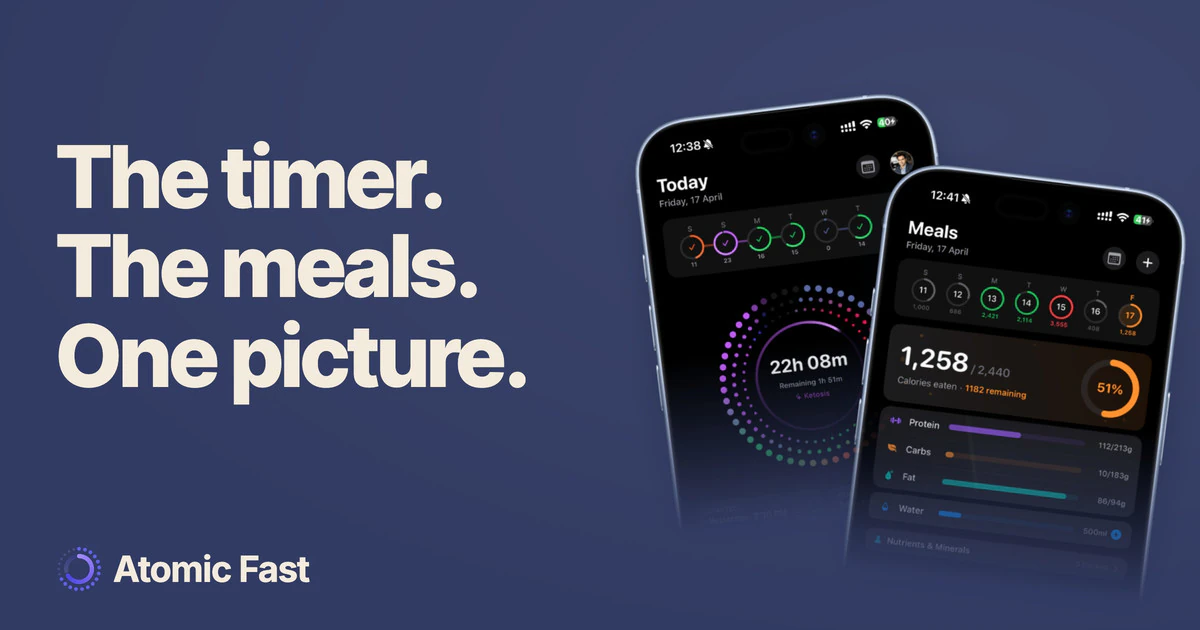
A timer can tell you when you started and stopped eating. It cannot tell you what was on the plate. A food log adds that second record, which is why we put both in Atomic Fast.
That can be useful without turning every meal into a score. It also comes with limits: a log contains estimates, and a longer fast is not proof of a better day.
The short version
A timer and a food log answer different questions: when did you eat, and what did you record? Together they can make forgotten drinks, meal timing or portion estimates easier to review. They cannot prove a calorie deficit, diagnose a plateau or guarantee weight loss. Tracking is optional, and it should not continue if it is making eating more anxious or restrictive.
What the weight-loss evidence supports
A 2026 Cochrane review included 22 trials with 1,995 participants. Compared with regular dietary advice, intermittent fasting generally made little or no difference to weight loss in the available trials. Several outcomes had low or very low certainty, and the evidence did not answer every question about long-term effects or adverse events.
A 12-month randomized trial published in 2023 compared an eight-hour eating window, daily calorie restriction and a control group. Both intervention groups lost weight; the study did not show a significant weight-loss advantage for the eating window over calorie restriction.
These studies help explain why a fasting streak alone is incomplete information. They do not test Atomic Fast, prove that everyone needs a food log or show that logging always improves adherence. We discuss the broader evidence in does intermittent fasting actually work.
What you can learn from a record
A log can help you ask more specific questions than “Why isn’t this working?” For example:
- What did I leave out? A milky coffee, cooking oil or snack is easy to miss when recalling a day later.
- How reliable is the portion? A saved entry may describe a different serving from the one you ate.
- What changed? Comparing records can reveal a shift in meal times or food choices without assuming it caused a change on the scale.
- What should I discuss? A record may help a dietitian understand your routine, provided keeping it feels manageable.
None of these makes the app a measurement of energy balance. Food entries can be incomplete, nutrition estimates can be wrong, and energy needs vary. A recorded total cannot establish why a weight plateau is happening.
How the two records fit inside Atomic Fast
The main Start Fast button starts a fast immediately with the displayed goal. More fasting options opens the goal and start-time choices, including an eligible last meal or a start scheduled up to 24 hours ahead. The timer’s phase labels use fixed elapsed-time bands; they do not measure what your body is doing.
Meal logging is separate. You can use manual food entry, database search or barcode lookup, or ask the optional AI tools to estimate a meal from a photograph or typed description. Review estimated foods and portions before saving. AI scans have a free-plan limit of seven successful scans a week; they are not an unlimited free feature.
The Daily timeline brings today’s recorded fasts, meals and water together when there is data to show. It is a useful way to inspect a day’s sequence. It does not establish cause and effect between a meal and a symptom.
A meal’s “Digestion complete” time is an estimate based on meal inputs. It isn’t a measurement or an instruction to begin fasting at that moment. The separate guide to when to start your next fast explains that distinction.
Where logging can become unhelpful
More detail isn’t always better. A photo cannot reveal every ingredient or the amount of oil used. Repeatedly logging the same inaccurate entry does not guarantee a reliable trend, and an exact-looking calorie number is still an estimate.
Tracking can also become compulsive. If it increases food anxiety, encourages compensatory fasting or feels difficult to stop, step back and seek appropriate support. Keeping only the timer is not automatically a safer replacement; the schedule can become restrictive too.
You can also decide that a detailed food log simply isn’t useful for your goal. The app can keep the records you choose without requiring you to use every feature.
A practical way to begin
Choose one question you want the record to help with, such as when dinner usually ends or whether a saved serving matches your plate. Record enough to examine that question, and check the entries rather than treating the totals as a verdict.
If a health professional has asked you to track something, follow their plan. If the data leaves you more confused, adding a longer fast is not a substitute for interpreting it. The useful outcome is a clearer conversation or a practical observation, not a perfect streak.
Frequently asked questions
Do I have to count calories while fasting? No. Eating-window trials have included participants who were not asked to count calories. A log is an optional record, not a requirement for every person or goal.
Can the food log confirm that I am in a calorie deficit? No. It estimates recorded intake and cannot precisely measure your energy needs or catch everything you did not enter.
Does Atomic Fast recommend a start time from digestion? The meal screen estimates digestion timing. That estimate is not a validated fasting prescription and does not determine when the timer must begin.
Should I keep tracking if it makes me anxious about food? No. Step back from the tracking or restriction and seek support when needed. A fasting timer can also become part of the problem, so switching to it alone is not automatically the answer.
Sources
Sources checked: October 11, 2026.
-
Garegnani et al. (2026), Intermittent fasting for adults with overweight or obesity. Cochrane Database of Systematic Reviews — Systematic review of 22 trials; does not test app logging or establish individual outcomes.
-
Lin et al. (2023), Time-Restricted Eating Without Calorie Counting for Weight Loss in a Racially Diverse Population. Annals of Internal Medicine — A 12-month eating-window versus calorie-restriction trial; does not establish an advantage from combining a timer and log.
Product verification: timer controls, meal entry, Daily timeline and free AI limits were checked against the current app source and product documentation. No device walkthrough or medical review was performed.
Atomic Fast is available on the App Store and Google Play.
This article is for general education and isn’t medical advice. If you’re pregnant, managing a health condition, taking medication, have a history of disordered eating, or are considering fasts longer than 24 hours, talk to a healthcare professional first.
Try Atomic Fast free
Track your fasts, log your meals, and see how they affect each other, on iPhone and Android.


 Scan to download