Fasting History and Streaks in Atomic Fast
Find saved fasts in Atomic Fast, see which day an overnight fast counts toward, and understand streaks, missing records and a daylight-saving limitation on Android.
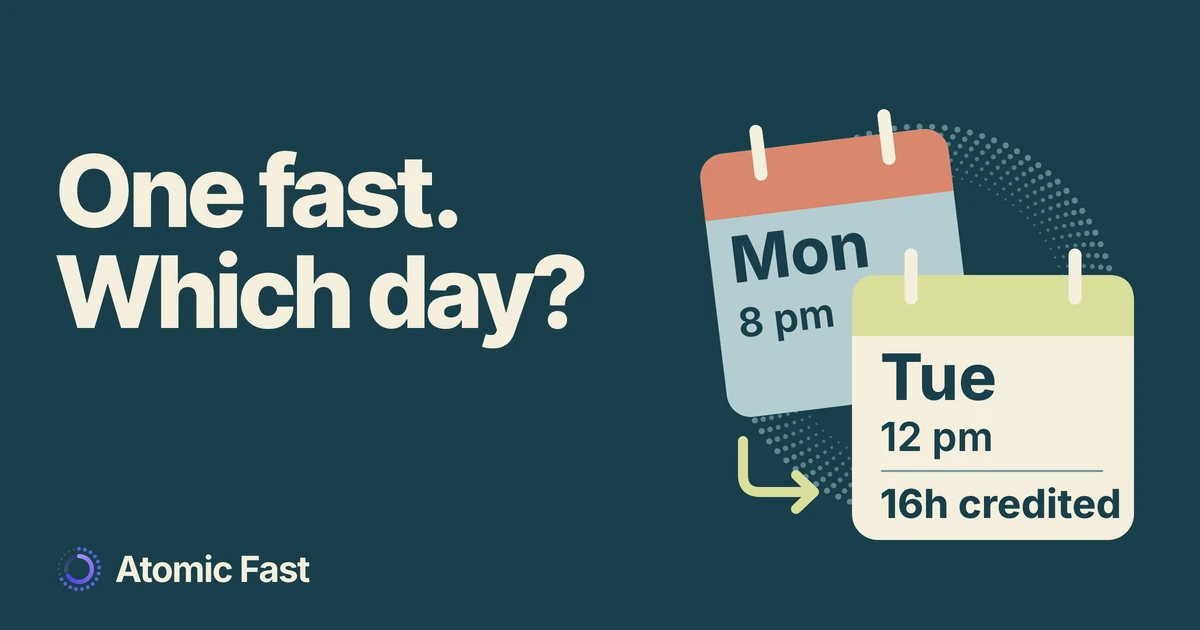
You started a fast on Monday evening and finished on Tuesday. The session is saved, but Monday’s fasting total doesn’t include it. Then you open history and see Monday beside the record. Both can be correct: the history row shows when you started, while daily credit follows when you ended.
Knowing which number you’re looking at makes a missing-day question much easier to resolve.
The short version
Atomic Fast credits a completed fast’s whole duration to its local end date. A streak counts consecutive dates with a saved completed fast, with today or yesterday as the latest credited date. A running fast hasn’t earned a completed-day credit, and two sessions ending on one date still represent one streak day. Android’s streak calculation can miscount around daylight-saving clock changes, so check the saved sessions before changing a record.
Find the session and its dates
These steps use the English labels on iPhone and Android. Start from the app’s normal signed-in view, after onboarding. The core history, timer and correction paths described here don’t require Atomic+ or an AI scan.
- Open Today and find Latest Fast. Once you’ve saved a completed session, its header or chevron opens Fasting Sessions. Tapping the body of Latest Fast opens that latest record for editing instead.
- Choose the session you want to check. History lists completed records. Its displayed date and time describe the start, so a Monday evening label doesn’t mean the hours were credited to Monday.
- Inspect Started and Ended in Edit Fast. Read the full dates as well as the clock times. If they’re already right, close the sheet without saving a change. If something is wrong, use the steps for correcting a recorded time.
- Open Insights, then Fasting Hours. This view lets you inspect fasting totals and the Streak value. The history list answers “which session?”; the daily total answers “which end date?”
If there’s no Latest Fast card yet, first check whether your session is still running. Opening End Fast isn’t the final save: the completion sheet has Save & Close and Save Without Details. Our first-fast walkthrough explains the finish-and-save sequence.
An overnight fast belongs to the day it ends
Suppose a saved fast begins Monday at 8 pm and ends Tuesday at noon, on dates without a clock change. That’s 16 elapsed hours. Atomic Fast credits all 16 to Tuesday: it doesn’t allocate four to Monday and twelve to Tuesday in the daily completed-hours total.
One saved session
Across midnight.
Credited to Tuesday.
Midnight is ¼ of the way through this interval.
This is an example of the counting rule, not a suggested duration. The same rule applies to another positive completed duration. Moving the end time across midnight can move the credited day even if the start date stays unchanged.
The day-attribution release changed this behavior, so some older daily totals and streaks could move by a date without a session being deleted. If you’re comparing an old screenshot with today’s chart, inspect the underlying Started and Ended values first.
Also distinguish a daily total from a timeline. A timeline showing the part of a fast that overlaps a particular day can show a slice of the interval. That isn’t a second completed session or a second day of streak credit.
A streak counts dates, not hours or sessions
A date qualifies when it has at least one non-deleted, completed fast with a positive recorded duration. Starting the timer, leaving it running or abandoning a session doesn’t give that date a completed credit.
Two fasts ending on the same date add their recorded hours to that date’s total. They still occupy one date in the streak. Similarly, one session extending across several calendar dates receives one credited end date; it doesn’t fill every date it crossed.
For a current streak, the app starts with the latest credited date. If that’s today, it counts backward from today. If it’s yesterday, it counts backward from yesterday. Each consecutive credited date adds one, and the first missing date breaks the run.
Illustrative week · today is Sunday
A gap separates
two runs.
streak days
- Mon Complete
- Tue Complete
- Wed No credit
- Thu Complete
- Fri Complete
- Sat Complete
- Sun In progress
In that example, it’s Sunday and the latest saved completion was Saturday. Thursday, Friday and Saturday make a three-day current streak. Sunday doesn’t add a fourth merely because a timer is running. The earlier Monday and Tuesday entries remain in history, but Wednesday’s gap separates them from the current run.
If Sunday passes without a completed record and Monday arrives, Saturday is no longer today or yesterday. The current streak becomes zero under the normal counting rule. That changes the current counter; it doesn’t erase the older sessions.
Treat the streak as a description of saved dates. It isn’t a reason to extend a fast or to rewrite accurate timestamps.
When the total or streak looks wrong
The running timer is longer than the completed total. These describe different records. If you’ve already completed a fast today, the Fasting Hours readout uses today’s completed hours. It doesn’t add the elapsed hours of a new active fast. If nothing has completed today and a fast is running, the readout can show its full elapsed time as in progress. That label doesn’t mean it has been saved as completed.
A real fast is missing. Check the session list and its end date before making a new record. If you never logged it, Today’s calendar lets you select the day it ended and choose Record Fast. Replace the proposed start and end with the actual interval, then save. Don’t create a second copy of a session that’s already there.
The hours moved after an edit. An end-date correction changes which date receives the whole duration. It can also change a streak by filling or removing a credited date. Review the corrected interval rather than trying to preserve the old counter.
The count changed around a clock change. The current Android implementation steps backward in fixed 24-hour intervals when calculating a streak. Local calendar days can be shorter or longer during daylight-saving transitions, so consecutive saved dates can be miscounted. iPhone’s calculation uses calendar-day steps. This is a known implementation limitation from our source review, not evidence that your records disappeared. Keep accurate times and report the discrepancy through support.
You’re checking after travel. Daily credit uses the device’s current local calendar and time zone. A recorded end instant near midnight can fall on a different local date after a time-zone change. Check the full displayed timestamps before assuming a duplicate or missing session; this guide doesn’t promise identical historical daily totals in every time zone.
Frequently asked questions
Do I have to reach my chosen goal for a saved fast to count? No. A positive-duration fast saved as completed can earn a date credit even when it ends before the chosen goal. Goal achievement and completed status are separate pieces of information. Record what actually happened.
Does choosing a different chart range reset my streak? No. The Streak value on Fasting Hours is calculated from the available session history, while the other summary figures use the selected range. Switching the view doesn’t start a new streak.
Does logging a meal automatically add a streak day? A meal record by itself isn’t a completed fast. Some meal-saving flows offer an explicit Break Fast & Log choice, which ends the active fast; simply saving a meal without ending it doesn’t supply a completed-day credit.
Can deleting a fast change an old streak? Yes. Deleted sessions are excluded from credited dates. If another completed fast still ends on that date, the date remains represented; otherwise deleting the only qualifying record removes that date’s credit.
Sources and product notes
Product information checked: October 26, 2026.
Product verification: We traced the iPhone and Android history routes, completion and editing actions, daily attribution and streak calculations in the current implementation. The day-attribution release notes document the change to whole-fast end-date credit. These checks establish how the app records and displays sessions; no mobile runtime walkthrough or clinical evaluation was performed.
Known limitation: Android’s fixed-interval streak calculation can miscount across daylight-saving transitions. The illustrated examples use unchanged local clock offsets. The detailed source evidence and reproducible counting check are retained with this article’s editorial review record.
Review your saved sessions in Atomic Fast on the App Store or Google Play.
Try Atomic Fast free
Track your fasts, log your meals, and see how they affect each other, on iPhone and Android.


 Scan to download