Free Fasting Timer Apps: What to Actually Look For
Looking for a free fasting timer? Check the core controls, paid limits, data handling and phase claims before choosing. Includes Atomic Fast’s own feature limits.
Last updated
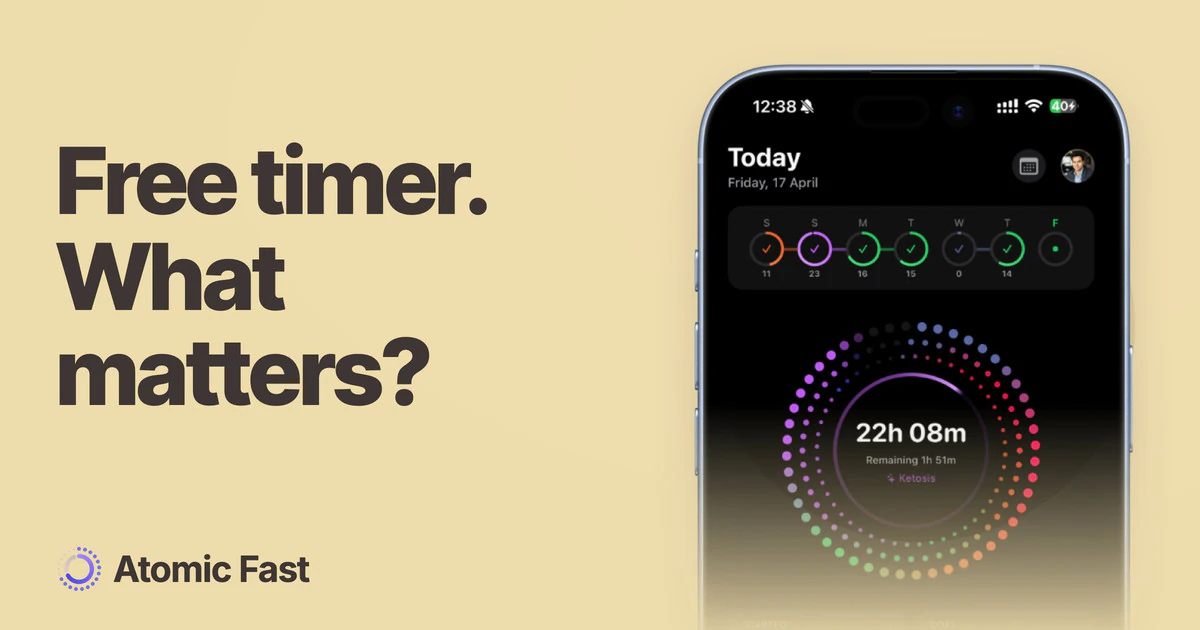
A free download tells you the price of installing an app. It does not tell you what you can keep using after setup.
Before comparing rings, charts or ratings, identify the task you want the app to do. Then check that exact task on its free plan. This is a selection checklist from the makers of Atomic Fast, not a current ranking of competitors.
The short version
Check whether starting and ending a fast, correcting a record and viewing history remain available without a subscription. Look at readability, useful settings and the data policy, then identify any scan limits or paid backup. Optional phase labels are educational displays, not body measurements. We explain Atomic Fast’s own limits below so you can apply the same questions to our app.
Find the paid boundary before relying on a feature
Store listings and in-app offers are the places to check current pricing. A free download, a trial and an ongoing free feature are different things. If you start a trial, read when it renews and what it costs.
Write down the few actions you need. For example: start after dinner, end in the morning, fix a missed start and see the saved session. Check each action rather than assuming the word “free” covers the entire app.
A paid feature is not automatically bad. The useful question is whether you need it and whether its price is clear. Avoid choosing a subscription on the strength of a feature you have not actually understood.
Judge the timer as a tool you will read often
Can you distinguish elapsed time from remaining time? Is the start action clear? Can you end early, and can you tell when a completed record has been saved?
Look at the display in the conditions where you will use it: small text, dark mode and your preferred language can matter more than an extra chart. A visually busy timer can be harder to read even when it has more features.
If you use Atomic Fast, our first-fast guide explains the instant-start button and the separate save step. The same general test applies elsewhere: understand what each tap actually does before relying on it.
Treat phase labels as optional context
Some apps divide the timer into named metabolic phases. That can be a convenient route to background reading. It cannot establish what is happening in your body at that moment.
A label such as ketosis or autophagy should have an explanation of its limits. An elapsed-time calculation is not a ketone test or a cellular measurement. Atomic Fast uses fixed hour bands; our phase guide explains them directly.
Do not use reaching a particular color or badge as a reason to ignore symptoms or extend a fast. A good record can include an early finish.
Decide whether you need a food log
Keeping meal records beside fasting records can make the day easier to review. It is an optional task, not a requirement to use a timer.
If you want it, check the available methods and allowances separately. Manual food entry, barcode lookup and AI recognition may have different pricing and connectivity requirements. A photo-derived nutrition value is also an estimate that needs a portion check.
Our explanation of pairing a timer with a food log gives the case for keeping both records. If a simple time record is all you need, you do not have to add meal logging to justify using an app.
Check history, reminders and control
Try the tasks you expect to repeat: find yesterday’s fast, correct a time and change a goal. Do not infer those actions from screenshots of an analytics screen.
For notifications, check the app’s settings and the operating system permission. A reminder still depends on device settings and delivery conditions; it should not be the only way you know what you intended to do.
A streak can help you review consistency, but it is not a health outcome. Look for a tool that lets you keep an honest record rather than one that makes a missed goal feel like something to conceal.
Read the data policy alongside the feature list
Distinguish data stored locally, content sent for online processing and optional cloud backup. Ask what leaves the device, which service receives it and whether the feature is optional.
A general privacy slogan is less useful than those specific answers. If the policy is unclear, seek clarification before entering information you are uncomfortable sharing. Unclear wording alone is not evidence that an app sells data.
Where Atomic Fast fits
We make Atomic Fast, so this section is our own product disclosure. The timer is free and works offline. You can keep meal records alongside it; barcode lookup, database search and manual entry are free, while AI scans have an allowance of seven successful scans per week on the free plan. Subscriber cloud backup is a separate paid feature.
AI scans include a food photo, nutrition-label photo or typed description. That content goes through our server to Google’s Gemini API to estimate nutrition. We do not store the request content, and Google’s own policy governs its side. Optional iCloud or Google Drive backup has a separate data path, described in our privacy policy.
The timer’s phase labels follow elapsed time. Meals do not personalize those bands. Logging food can add a separate digestion estimate, but that is not a measured body state or an automatic command to start fasting.
We are not claiming that our app is the only useful choice or that every possible feature is free. Check the current plan details for the functions you need, including any platform-specific extras.
Frequently asked questions
Does free to download mean the timer is free forever? No. Check the app’s current free features, trial terms and subscription offer. Installation price alone cannot answer that.
Do I need an app to fast? No. An app records time and may make recordkeeping easier. It does not determine whether fasting is appropriate for you.
Do phase labels prove that a fast is working? No. Elapsed-time labels cannot confirm glucose, ketones, autophagy or a health benefit.
What is paid in Atomic Fast? The free plan caps successful AI scans at seven per week, and cloud backup is for subscribers. The timer, barcode lookup, database search and manual entry are free. Check current plan details for other features.
Does every feature work offline? No. Atomic Fast’s timer works offline, while AI scans, food search and barcode lookups need a connection.
Sources and product notes
Product information checked: October 11, 2026.
- Atomic Fast — Privacy Policy — Describes local records, optional AI processing and subscriber cloud backup. This is first-party product information.
Product verification: Reviewed the timer, AI scan allowance, logging methods and backup entitlement in product documentation and app code. This is source verification, not a hands-on comparison of competing apps.
Try Atomic Fast on the App Store or Google Play, and check the free features against the tasks you need.
This article is for general education and isn’t medical advice. If you’re pregnant, managing a health condition, taking medication, have a history of disordered eating, or are considering fasts longer than 24 hours, talk to a healthcare professional first.
Try Atomic Fast free
Track your fasts, log your meals, and see how they affect each other, on iPhone and Android.


 Scan to download